

How to Schedule Messages to Send Later on GB WhatsApp
Messaging apps are designed for instant communication, but not every message needs to be sent immediately. Sometimes you want a message to arrive at a specific time, such as a birthday greeting, a reminder, or a follow-up you don’t want to forget. This is where message scheduling becomes useful.
GB WhatsApp includes a built-in message scheduling feature that allows users to write messages in advance and send them automatically at a chosen time. This function is not available in the official WhatsApp app, which is why it often draws attention from users looking for more control over their messaging habits.
This article explains what message scheduling is, how it works in GB WhatsApp, and when it can be useful in everyday communication.
What Is Message Scheduling in GB WhatsApp?
Message scheduling is a feature that lets users prepare a message and assign it a specific date and time for delivery. Once scheduled, the message is sent automatically without any further action from the user.
In GB WhatsApp, scheduling is usually integrated directly into the chat interface or available through an internal scheduling tool, depending on the version being used.
How to Schedule a Message in GB WhatsApp
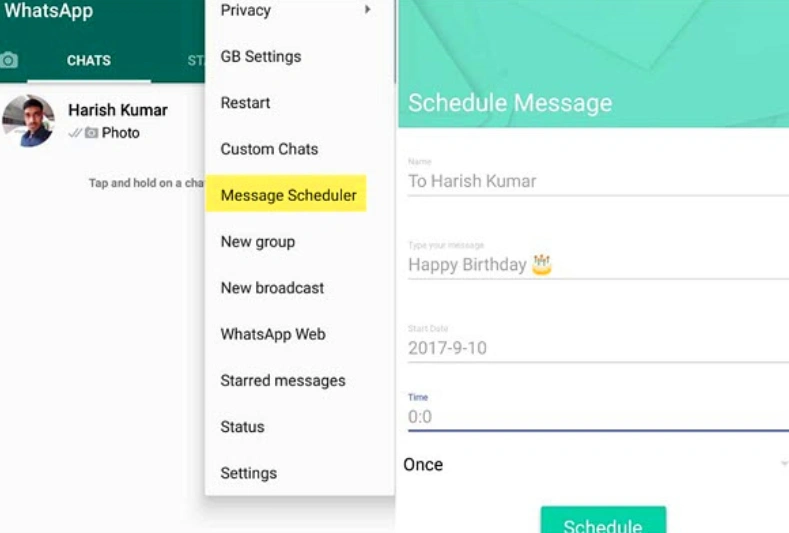
The scheduling process is simple and doesn’t take long:
- Open the chat where you want to send the message.
- Type your message as usual.
- Tap the scheduling option instead of sending immediately.
- Select the date and time.
- Confirm to schedule the message.
After this, the message will be sent automatically at the chosen time.
Can You Edit or Cancel a Scheduled Message?
Yes. Most versions of GB WhatsApp allow you to manage scheduled messages. You can view them in the scheduler section and make changes if needed. If plans change or you rethink the message, you can cancel it before it’s sent.
This flexibility is helpful, especially when scheduling messages far in advance.
Limitations and Things to Consider
While message scheduling can be helpful, there are a few limitations worth understanding. First, this feature is not part of the official WhatsApp application. It is only available in modified versions like GB WhatsApp, which means availability and behavior can differ depending on the version installed.
Second, scheduled messages depend on the app functioning correctly. If the app is force-stopped, restricted from running in the background, or not updated properly, scheduled messages may not be sent at the expected time. Allowing background activity and keeping the app updated helps reduce this risk.
Finally, scheduling should be used thoughtfully. Overusing automated messages can make conversations feel less personal, especially in close relationships. It works best as a supportive tool rather than a replacement for real-time communication.
Is Message Scheduling Safe to Use?
From a technical perspective, message scheduling is simply an automation feature. However, because it exists in modified apps, users should be aware that these apps are not officially supported by WhatsApp.
Each user should decide whether the added functionality is worth the trade-offs. Understanding how the feature works and using it responsibly can help minimize potential issues.
This article is intended to explain functionality, not to promote or guarantee safety.
Everyday Examples of Scheduled Messaging
To better understand how message scheduling fits into daily life, consider a few common scenarios. Someone may schedule a reminder message to themselves or a family member about an appointment later in the day. Another user might prepare a congratulatory message in advance for a friend’s important event.
In work-related chats, scheduling can help with follow-ups that need to be sent at specific times, such as checking in after a meeting or sending information during business hours.
These examples show that scheduling is less about automation and more about timing.
Final Thoughts
Message scheduling in GB WhatsApp is a practical feature designed to give users more control over when their messages are sent. It helps prevent forgotten messages, reduces unnecessary interruptions, and supports more intentional communication.
While it is not a feature available in the official WhatsApp app, many users find it useful for managing everyday conversations. Like any tool, it works best when used thoughtfully and with a clear purpose.
For users who already use GB WhatsApp, message scheduling can be a quiet but effective way to improve how and when messages are delivered.